KMLMapServer turns your UMN MapServer installation in a flexible KML vector and raster data server. Dynamically serve your MapServer data straight into Google Earth.
Goal
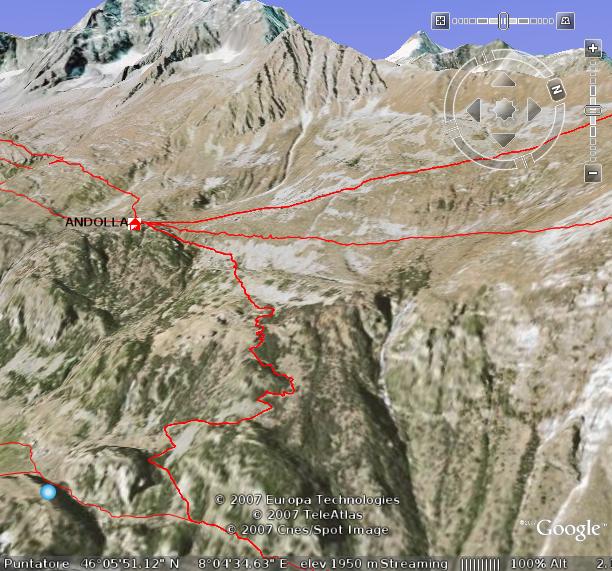 The goal of this project is to add KML output capabilities to any running MapServer installation. It will run out-of-the-box with zero or minimal configuration. Basically you just install this package somewhere under you web server root and it will work without any configuration. Configuration, if needed, is done through metadata in the MapServer’s mapfile, so you don’t have any other configuration files to worry about.
History
This project comes from a simple idea: while we already have quite a few running MapServer installations, most of them are related to mountain hiking and trekking. A 3-dimensional view of the territory can bring a significative advantage while planning your holidays in the mountains. So we decided to start this project, in order to display our paths and tracks data in a 3D view using Google Earth.
Requirements
 In order to add KML server capabilities to you MapServer installation, you should have:
- a running UMN MapServer CGI, possibly configured as WFS server if you want to serve raster layers too
- PHP5 with php_mapscript
How it works
The layer server
 KMLMapServer was designed with OGC webservices in mind, when possible, the parameter names and meaning are the same as in WFS OGC service, and you normally call KMLMapServer with CGI-style parameters passed on the URL.
A typical call would be:
http://www.myserver.com/kmlservice.php?map=/maps/mapfile.map&typename=roads,rivers
In this example the layers “roads” and “rivers” from mapfile /maps/mapfile.map are sent to the browser.
Note that you don’t need to specify the layer name(s), you can also get a KML with all the layers in the mapfile, in this case the layers will be served as a folder of Network Links.
KMLMapServer was designed with OGC webservices in mind, when possible, the parameter names and meaning are the same as in WFS OGC service, and you normally call KMLMapServer with CGI-style parameters passed on the URL.
A typical call would be:
http://www.myserver.com/kmlservice.php?map=/maps/mapfile.map&typename=roads,rivers
In this example the layers “roads” and “rivers” from mapfile /maps/mapfile.map are sent to the browser.
Note that you don’t need to specify the layer name(s), you can also get a KML with all the layers in the mapfile, in this case the layers will be served as a folder of Network Links.
The icon server
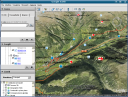 The icon server is an independent package that creates PNG images of the symbols used for point layers.
It is called through the same endpoint of the main service, the request type is “icon”.
See the image for some example symbols how they appear in the table of contents (click to enlarge).
The icon server is an independent package that creates PNG images of the symbols used for point layers.
It is called through the same endpoint of the main service, the request type is “icon”.
See the image for some example symbols how they appear in the table of contents (click to enlarge).
Features
- KML and KMZ (compressed) output
- Simple cache system to reduce server load with big vector data layers
- Independent symbol server for POINT layers icons
- Customizable Balloons (tooltips) in Google Earth with attribute substitution template
- Limited support to MapServer’s classes and styles for thematic mapping
- Limited support to ogc filter encoding for single vector layer requests
- Raster support through WMS network links
 To take fully advantage of some of these feature, additional configuration could be required.
Known issues, limitations
- Styles and classes:
- only one style for each class is parsed, if you have multiple styles in one class, the values of the last one are used
- only color, outlinecolor, backgroundcolor, symbol, size and width are parsed
- Filled polygons:
- filled polygons fail to wrap on the mountains (this seems a Google Earth bug), a define(‘TREAT_POLY_AS_LINE’, true) control this behaviour
- polygons boundaryes do not clamp to ground correctly (this also seems a Google Earth bug), define(‘TREAT_POLY_AS_LINE’, true) convert them in line strings
Configuration
Most of KMLMapServer features should work without any additional configuration.
Configuration is done through CGI-style values passed on the query string and with special metadata in the mapfile
CGI-PARAMETERS
| Name |
Type |
Required |
Values |
Notes |
| request |
string |
no |
kml kmz icon |
request type (OGC WFS like) |
| map |
string |
yes |
|
path to mapfile |
| typename |
string (can be a CSV list) |
no |
|
layer(s) to be served, if empty all layers are served as network links |
| filter |
string |
no |
|
well formed XML OGC filter, is active only when a single layer is requested |
| bbox |
string |
no |
|
standard bbox (not yet implemented) |
| encoding |
string |
no |
|
mapfile and attributes encoding, default to ISO-8859-1 |
METADATA
KMLMapServer re-use most of existing OGC metadata taken from the LAYER section of the mafile, and define a few of its own.
None of them are required, but if you want to serve rasters you already need them in order to have a working WMS MapServer installation.
Note for rasters: add EPSG:4326 to WMS_SRS metadata on all mapfile layers, otherwise WMS will not work with Google Earth.
| Name |
Meaning |
Layer type |
Notes |
| RESULT_FIELDS |
The column from which to take the name for the feature |
Vector |
Defaults to the first column, the name is displayed in Google Earth Balloons and table of contents |
| DESCRIPTION_TEMPLATE |
Custom description template |
Vector |
If present, this is used to build the description string. Parameters surrounded by “%” char are substituted with real values from the corresponding field for the feature |
| BALLOON_TEMPLATE |
Custom balloon (tooltip) template |
Vector |
If present, this is used to build the tooltip. HTML formatting is possible, $[name] ans $[description] are substituted. |
| DESCRIPTION
OWS_TITLE
WFS_TITLE
WMS_TITLE |
Layer description |
All |
All those metadata are searched (in this order) to get a layer description |
| KML_CACHE |
Cache life |
Vector |
Number of seconds after which the cache will expire for a particular layer, if empty or not exists, the cache will be disabled for that layer. Defaults to 0 (cache disabled) |
| KML_SKIP |
Skip this layer |
All |
Do not serve this layer, default to false |
Licencing
Licence: AGPL.
Additional services such as installation, configuration, testing, trouble-shooting and assistance are available at highly competitive price.
Feel free to contact us about KMLMapServer: go to contact page.
Download
http://sourceforge.net/projects/kmlmapserver/

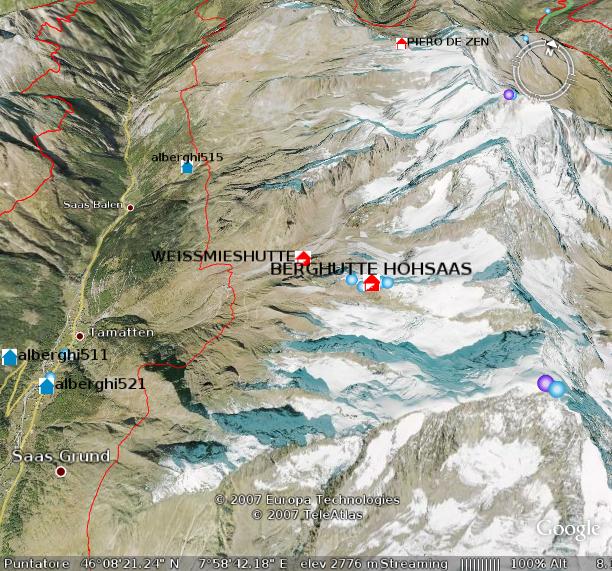 KMLMapServer was designed with OGC webservices in mind, when possible, the parameter names and meaning are the same as in WFS OGC service, and you normally call KMLMapServer with CGI-style parameters passed on the URL.
A typical call would be:
http://www.myserver.com/kmlservice.php?map=/maps/mapfile.map&typename=roads,rivers
In this example the layers “roads” and “rivers” from mapfile /maps/mapfile.map are sent to the browser.
Note that you don’t need to specify the layer name(s), you can also get a KML with all the layers in the mapfile, in this case the layers will be served as a folder of Network Links.
KMLMapServer was designed with OGC webservices in mind, when possible, the parameter names and meaning are the same as in WFS OGC service, and you normally call KMLMapServer with CGI-style parameters passed on the URL.
A typical call would be:
http://www.myserver.com/kmlservice.php?map=/maps/mapfile.map&typename=roads,rivers
In this example the layers “roads” and “rivers” from mapfile /maps/mapfile.map are sent to the browser.
Note that you don’t need to specify the layer name(s), you can also get a KML with all the layers in the mapfile, in this case the layers will be served as a folder of Network Links.
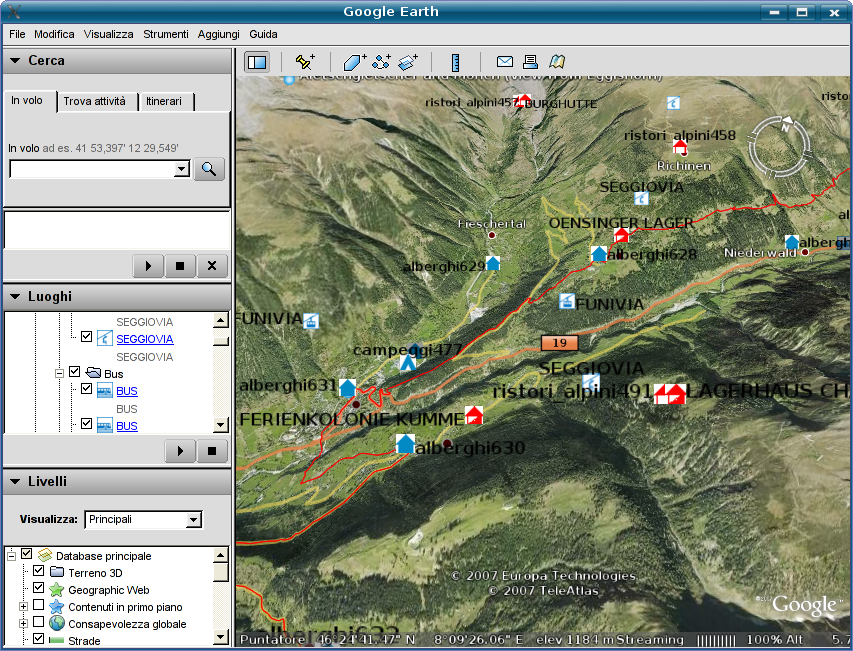 The icon server is an independent package that creates PNG images of the symbols used for point layers.
It is called through the same endpoint of the main service, the request type is “icon”.
See the image for some example symbols how they appear in the table of contents (click to enlarge).
The icon server is an independent package that creates PNG images of the symbols used for point layers.
It is called through the same endpoint of the main service, the request type is “icon”.
See the image for some example symbols how they appear in the table of contents (click to enlarge).
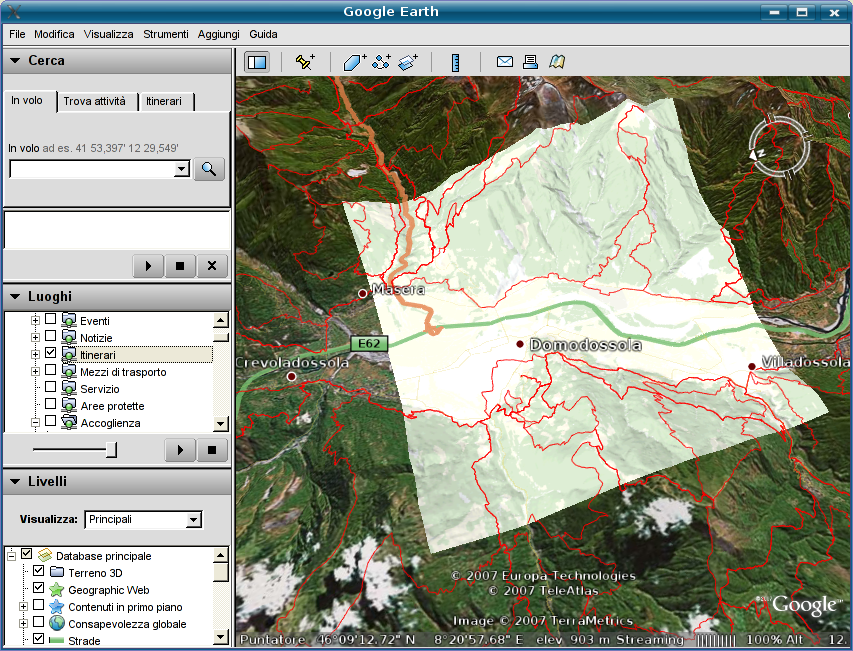 To take fully advantage of some of these feature, additional configuration could be required.
khader
Dear Sir,
I am very happy to see this utility. I was really looking for such a utility since a long time. At presently i was testing it but it gives the below errors please can you help me.
Best Regards
Khader Mohiuddin.
khadermat@yahoo.com
Warning: include(classes/kmlserver.class.php) [function.include]: failed to open stream: No such file or directory in C:\ms4w\apps\tutorial\kmlserver.php on line 1477
Warning: include() [function.include]: Failed opening ‘classes/kmlserver.class.php’ for inclusion (include_path=’.;\ms4w\Apache\php\PEAR’) in C:\ms4w\apps\tutorial\kmlserver.php on line 1477
Warning: KmlServer::include(layerserver.class.php) [function.KmlServer-include]: failed to open stream: No such file or directory in C:\ms4w\apps\tutorial\kmlserver.php on line 1418
Warning: KmlServer::include() [function.include]: Failed opening ‘layerserver.class.php’ for inclusion (include_path=’.;\ms4w\Apache\php\PEAR’) in C:\ms4w\apps\tutorial\kmlserver.php on line 1418
Fatal error: Call to a member function getProjection() on a non-object in C:\ms4w\apps\tutorial\kmlserver.php on line 611
Alessandro Pasotti
Those are trivial php errors.
Your installation is plain broken.
Either you moved the classes folder after unpacking or have wrong permissions on ‘classes’ folder or its files.
Khader Mohiuddin
Dear Sir,
Thank you very much, its working fine now. The folder was moved.
Best Regards,
Khader Mohiuddin.
khadermat@yahoo.com
Mariana
Ciao, non se scribere molto bene in italiano ma poso leggere. Per cuesto adesso scribo in spagnolo. Escusatemi.
Estimados, quisiera saber como debo instalar esta aplicacion, tengo intalado mapserver y ya descargue de aqui http://sourceforge.net/projects/kmlmapserver/ el kmlmapserver. Ahora estoy a la deriva, ayuda please.
Molto grazie.
Alpend
How do i install application on existing map server.
Thanks all
Welton
Dear developer,
I got pretty happy since I’ve found your website. KML’s great!!! I’d like to give it a try and to do so I’ve installed KML Mapserver service under MS4W package – http://www.maptools.org/ms4w/index.phtml. However, I don’t have any valid mapfile example to see how it works with Google Earth. I wanted to see examples of how the layers need to be set in order to access Google Earth’s Services.
Congratulations! I look forward to read your answer.
Welton
Alessandro Pasotti
@Welton
I’m not sure about how to help you. KML MapServer should work without any particular layer setup with most common layer types (point, line, polygon and raster).
If you’re seeking help about mapserver (and mapfile) setup you should ask in the mapserver-users mailing list:
http://lists.osgeo.org/mailman/listinfo/mapserver-users
Just keep in mind that, in order to work, KML MapServer needs a working mapserver and php_mapscript installation, and a working mapfile. Before trying KML mapserver make sure your mapfile is working correctly.
Hope it helps.
Welton
Hi, thanks for your prompt answer.
I’m not sure if was clear enough. I was thinking KML Service would help to bring together maps retrived by regular layers (described in the mapserver mapfile) and “special” layers (also described in mapserver mapfile) that would retrived data+maps from Google Earth. So, through the same mapfile I’d be able to see maps rendered by local layers + Google’s layers without any other direct implementation to access Google’s API. Did I get it wrong or this is it?
I have some experience with mapserver but I was wondering if there was something that could help me to bring Google’s maps into my application without changing the front-end a lot.
Thanks again.
Alessandro Pasotti
@Welton
No, KML MapServer is about serving KML from standard MapServer layers, you can also see it as translator layer between mapserver and google earth that adds KML output to mapserver.
If there is something in the docs that could be misleading regarding what KML MapServer does, please let me know (I’m not an English speaker, so forgive me if I was not clear enough).
Regarding your last point, I think that openlayers let you bring together several map providers (like google maps) in a single webgis 2D interface.
Welton
Hi Alessandro,
Thanks, you helped me indeed. Anyway I’m gonna take a deeper look at the docs and see if it serves my purpose. As I said I’m looking for something that brings Mapserver’s layers + Google’s layers (Earth and/or Maps) together using me same application without having to change it.
By the way, your english is quite good. Thanks a lot.
Welton
Lionel
Hi Alessandro. I ‘ve played a lot with your kmlservice. Thanks a lot, it’s very usefull to publish easyly information in GE from Mapserver. I have a problem and perhap’s you can help me.
Points in my postgis database have the following coordinates :
POINT(-54.1349307585359 5.35234816882875)
And published with kmlservices :
54.13493059855571,5.352348023290587,0
so the minus has desapeared !
I have the same with polygons. :
MULTIPOLYGON(((-54.1575773002721 5.37481412072896,-54.1125144353665 5.37504584594057,-54.1122858647611 5.32988039295894,-54.1573454337436 5.32965062576395,-54.1575773002721
5.37481412072896)))
becomes with kmlservice output :
54.15757730027205,5.374814120728962,0 -54.11251443536646,5.375045845940568,0 -54.11228586476116,5.329880392958938,0 -54.15734543374361,5.329650625763946,0 -54.15757730027205,5.374814120728962,0
(only the first point x coordinate is concerned).
Thanks for help
Alessandro Pasotti
@Lionel
It sounds like a bug. I uploaded a fix, would you please test the latest SVN version and report?
svn co https://kmlmapserver.svn.sourceforge.net/svnroot/kmlmapserver kmlmapserver
Lionel
it works !
Thanks a lot
Daniel
Today I am trying to run KML Mapserver to my working MapServer machine…
I always got error message below. Is there anyone know what it is?
—–
Parse error: parse error in \ms4w\Apache\htdocs\kmlservice.php on line 1541
Alessandro Pasotti
@Daniel
Thanks for using kmlmapserver. Please note that:
kmlservice.php has 29 lines, your error is probably not related with kmlmapserver.
Daniel
Hi,
Now I see. I downloaded the code from SVN. the file structure is as below.
kmlservice.php
LICENSE.htm
README.htm
CHANGELOG.htm
cache
classes
doc
I am not familiar with PHP but I am trying to setup this service in my current working MapServer. So the above files/folders where I should put? I guess it is under ms4w/Apache/php, is that correct? Is there anythink I should look into?
Thanks,
Daniel
Alessandro Pasotti
@Daniel
yes, as stated in the README, you just put the folder tree under your document root and it should work.
For generic help on PHP please refer to the thousands of forums and discussion boards available on the net.
BTW we are available for commercial support in case you need it.
Daniel
I got error message below. I am sure I have php_mapscript.dll in that folder….sorry to bother you….
Warning: dl(): Unable to load dynamic library ‘/ms4w/Apache/php/extensions/php_mapscript.dll’ – The specified module could not be found. in F:\APS\Software\ms4w\Apache\htdocs\classes\kmlserver.class.php on line 42
Parse error: parse error in F:\APS\Software\ms4w\Apache\htdocs\classes\layerserver.class.php on line 326
Vishal Agarwal
Hi,
I am not able to configure it. Can you please tell me where do I unzip the KMLServer files? The Readme does not have any information. For the following request
http://localhost/cgi-bin/kmlserver/kmlservice.php?map=india.map
I get the following error
The server encountered an internal error or misconfiguration and was unable to complete your request.
Please contact the server administrator, admin@local.domain and inform them of the time the error occurred, and anything you might have done that may have caused the error.
More information about this error may be available in the server error log.
Please Help!
Vishal Agarwal
hey it was a simple PHP issue, thanks for developing this works perfectly!
Selly
Ciao,
sono un neofita del mondo mapserver, ma sono interessato al kmlmapserver. Ho installato ms4w w il pacchetto kmlmapserver, ma non trovo un esempio di map file da seguire. Potete mandarmi un esempio di map file ?
Grazie 1000
Bel lavoro !!!
Selly
Ho caricato un map file, che funziona con gmap, ora non riesco a vederlo con kmlmapserver. Non capisco cosa manca ?
ecco il kml chreato :
cantone Ticino – Service WMS
0
Servizio WMS del SITTI
<![CDATA[Geoservice du Systeme d’Information du Territoire Ticino.
» Le GEoportail de l’Etat de Tessin
Tout droit reservè (SITTI)]]>
8.871711
46.160298
0
200000
0
0
prova_deca
0
livelli test
http://pc000006428/kmlmapserver/kmlservice.php?map=deca.map
ed ecco il map file che si trova sotto htdocs di apache:
#
# Start of map file
#
# Sample map file for a chameleon app.
#
NAME DEMO
STATUS ON
SIZE 800 600
SYMBOLSET ../etc/symbols.sym
EXTENT 667000 72000 740000 170000
UNITS METERS
SHAPEPATH “./data”
IMAGECOLOR 255 255 255
FONTSET ../etc/fonts.txt
TRANSPARENT FALSE
#
# Start of web interface definition
#
WEB
#MINSCALE 2000000
#MAXSCALE 50000000
#
# On Windows systems, /tmp and /tmp/ms_tmp/ should be created at the root
# of the drive where the .MAP file resides.
#
IMAGEPATH “/ms4w/tmp/ms_tmp/”
IMAGEURL “/ms_tmp/”
LOG “/ms_tmp/gmap.log”
METADATA
wms_title “WMS DECA”
wms_onlineresource “http://pc000006428/cgi-bin/mapserv.exe?map=deca.map&”
END
END
#
# Start of reference map
#
REFERENCE
IMAGE images/keymap.png
EXTENT 667000 72000 740000 170000
STATUS ON
COLOR -1 -1 -1
OUTLINECOLOR 255 0 0
SIZE 120 90
END
#
# Start of legend
#
LEGEND
KEYSIZE 18 12
LABEL
TYPE BITMAP
SIZE MEDIUM
COLOR 0 0 89
END
STATUS ON
END
#
# Start of scalebar
#
SCALEBAR
IMAGECOLOR 255 255 255
LABEL
COLOR 0 0 0
SIZE SMALL
END
SIZE 150 5
COLOR 255 255 255
BACKGROUNDCOLOR 0 0 0
OUTLINECOLOR 0 0 0
UNITS kilometers
INTERVALS 5
STATUS ON
END
QUERYMAP
STYLE HILITE
COLOR 255 0 0
END
PROJECTION
“init=epsg:4326”
END
#
# Start of layer definitions
#
LAYER
GROUP “Raster”
NAME CN200000
METADATA
“DESCRIPTION” “Elevation/Bathymetry”
“GROUP” “Raster”
“LAYER” “bathymetry”
END
TYPE RASTER
STATUS ON
DATA ti200_508.tif
PROJECTION
“init=epsg:4326”
END
END #layer
END # Map File
Potete aiutarmi ?? Grazie
Alessandro Pasotti
@Selly
Per il supporto commerciale (a pagamento), contattaci via email.
Selly
Non si tratta di supporto commerciale, è una semplice domanda, se non vi va di rispondere prendo nota e cambio direzione. Ho mandato l’esempio visto che voi di esempi non ne date.
Grazie comunque
Alessandro Pasotti
@Selly
non si tratta di “ci va” o non “ci va” di rispondere, kmlmapserver è open source e gratuito, il supporto invece si paga.
Se avesse letto la documentazione si sarebbe accorto che con le limitazioni indicate, kmapserver lavora con qualsiasi mapfile “out-of-the-box” quindi senza nessun particolare accorgimento a parte quelli indicati.
Per i dettagli e gli esempi sui mapfile, non è a noi che deve chiedere ma semmai alle innumerevoli liste che si occupano di mapserver.
Cordialmente.
DESHOGUES Arnaud
Ciao Alessandro.
I’m a student in Master PRO specialised in GIS: Master SIGMA from Toulouse.
I’am actualy on my training period where i’am working on a Web GIS application. My data base are based on postgresql/postgis and my webserveur is naturally Mapserveur.
I have develop a map file using pmapper environment and I would like to put my data on G.Earth or G.Maps with your kmlservice.
I have a problem and perhaps you can help me.
I have make my map file using your indication but when I make the URL I’ve got a doc.KML without informations, just an info windows with the name of the layer insert on the URL.
Thanks for your answer
If you don’t mind i could make for you the French traduction for your web page and develop a tutorial.
Congratulation
Arnaud :p
edmar moretti
Hi,
we are using kml-map-server to see our layers in google earth. The tree of layers, organized in i3geo (http://mapas.mma.gov.br/i3geo), is now visible inside Google Earth. To see in action, open google earth and insert the http://mapas.mma.gov.br/i3geo/kml.php in the option Add->Network Links
Parabéns pelo trabalho!
Venkat
Dear Sir,
I want to use it into C# asp.net.Is it possible.If it is possible?I am developing Mapserver with C#.I want to use KML.If it is possible Please guide me.
I am waiting for your gret response.
Thanks and Reagrds
Venkat.
Alessandro Pasotti
@Venkat
kmlmapserver is developed in PHP language.
So, the answer is no.
Agnar Renolen
Just tested kml-map-server, and I have found a bug:
KML-mapserver does not class layer expressions that use regeular expressions in the Map file, such as:
LAYER
…
CLASSITEM ‘myattr’
…
CLASS
…
EXPRESSION /regex/
…
END
END
KML-Map-server simply returns all items within the source layer source ignorting the class expression.
Alessandro Pasotti
@Agnar
your statement is not true: kmlmapserver takes into account *only* regexes in class expressions (with some known limitation as written in the article and in the README).
This does’nt mean that there could be a bug in the code, so you have two options now:
* provide more detailed informations about this could-be bug and a provide a test case in order to allow us to reproduce the bug and fix it (the right place for bug report is : http://sourceforge.net/tracker/?group_id=206335 ), in any case we are very busy at the moment and this bug will not be examined before Q2 2009
* fix the bug yourself (preferred option) and send us the patch
Regards.
Jitendra Kulkarni
Hi Alessandro,
Congrats for good thought and efforts for mapserver users.
I have configured on my local system. I have multiple Apache servers running on it. I use Port 84 for the MS4W application. I am using UTM coordinates and not decimal, degrees for my mapserver.
Problems I face as follows.
1. When it generates KML file it still considers port 80 as follows
2. I am unable to see my line (Proposed Route) as per my shape file on the google earth.
Thanks in advance for your help.
Jitendta
My KML file as follows
India
0
http://localhost:80/kmlmapserver/kmlservice.php?map=C:\\ms4w\\apps\\MyGIS-1\\config\\default\\test.map&typename=India&request=kml&encoding=ISO-8859-1
Proposed_route
0
http://localhost:80/kmlmapserver/kmlservice.php?map=C:\\ms4w\\apps\\MyGIS-1\\config\\default\\test.map&typename=Proposed_route&request=kml&encoding=ISO-8859-1
Guo Lixia
Hi,
I use ms4w for some time, I am very interested in the kmlmapserver, however after I release the kmlmapserver package and place it under ms4w\Apache\htdocs, and call the url “http://localhost/kmlmapserver-0.5/kmlservice.php?map=/ms4w/apps/ms_ogc_workshop/service/zz.map&typename=provincelocal” there is a http 500 erro, and a popup dialoge box says”CGI/FastCGI”problem, I do not know why.
Thanks and Regards!
Linda
Alessandro Pasotti
@Guo,
I also don’t know why: we are now two 🙂
David Askov
Congratulations on building such an easy tool. I have placed field values in my RESULT_FIELDS and DESCRIPTION_TEMPLATE, but cannot figure out a way to include field values in my balloon templates. Is this possible?
I was thinking something like this:
BALLOON_TEMPLATE “Deaths: %CONFIRMED_DEATHS%”
Here is a bit of a WFS response for the layer:
USA
Georgia
1
0
0
406
thanks!
David Askov
My WFS response (with XML) got whacked when the form was submitted. The point was that there is a field called “CONFIRMED_DEATHS” coming from the WFS feed.
Alessandro Pasotti
@David,
You need to put “%” fields in DESCRIPTION_TEMPLATE, then put $[description] somewhere in BALLOON_TEMPLATE, kmlmapserver will first substitute “%” fields in DESCRIPTION_TEMPLATE, then substitute $[description] in BALLOON_TEMPLATE with the results of the first substitution.
David Askov
Worked great! Thanks.
Arnaud
Hi,
I’m trying to use your KML Map Server class.
Everything works fine when I specify a typename paramater like in this URL :
http://MyServer/kmlservice.php?map=/MyMap.map&typename=MyLayer
The return is an XML file with all the objects inside.
When I use it whith no typename parameter the XML file look like this :
zones_sfr
1
http://localhost:80/kmlservice.php?map=/MyMap.map&typename=zones&request=kml&encoding=ISO-8859-1
cellules_sfr
1
http://localhost:80/kmlservice.php?map=/MyMap.map&typename=cellules&request=kml&encoding=ISO-8859-1
But when I use in Google Earth the server icon is always red. Like he can’t dynamically load the XML.
Do you know what I’m doing wrong?
Best regards
Arnaud
Alessandro Pasotti
@Arnaud,
localhost ?
Sorry if I’m too rude, but your question indicates such a low knowledge of the web and it services that I strongly suggest you to hire a professional or to invest some more time studying.
Vincent Bonnal
Hello,
I want to use KML Mapserver but I need to control the file name generated by KML Mapserver. By default, the file name is doc.kml (or doc.kmz). Is there an hidden parameter for that 😉 ?
Thank you for this component !
Alessandro Pasotti
@Vincent
no, you need to modify the code and add a new metadata and parameter for the file name.
Not an easy job though.
Vincent Bonnal
Thank you for your answer Alessandro.
It was not too complicated …
I added a parameter “kmxfilename”, I changed get_request () to read it and I changed send_header () and send_stream ().
Everything is ok!
Thank you for this script.
Lionel
Hi,
I try to use kmlmapserver with GoogleEarth v5.1.
I still work with Google v4.2, but I have troubles with the last version. Polygons are not correct and points are not correctly represented (all points have the same coordinates).
Have you heared about changes in KML specifications that could append with kmlmapserver ?
Alessandro Pasotti
@Lionel:
yes we have indeed had some problems due to a KML spec change (KML parser has become more strict), we have done some changes in our other internal libraries but we didn’t find the time to fix kmlmapserver.
I received a patched version three days ago but I don’t know if this version fixes your problem, if you have time to work on this issue and if you are willing to commit back your findings I could send it to you for testing.
Also: are you sure the problem is not in your Google Earth build ? I’ve observed a similar issue under a 64bit linux distribution and it was just a library problem.
Lionel
The problems seems to be identified. Only Linux google earth version are affected.
A solution exists here :
http://www.google.com/support/forum/p/earth/thread?tid=72b851d55f188cea&hl=en
(not tested yet).
Lionel
Well, this problem only affects linux google earth 5.1 version.
A solution exists, described here :
http://www.google.com/support/forum/p/earth/thread?tid=72b851d55f188cea&hl=en
Tested, works fine !
Thanks,
Mwaura
Thats a very fine application,thanks.
I am using Mapserver data from a postgis database.When i use the script it servers a doc.kmz file alright but opening it in google earth it seems there is no data inside.The file is 4kb.
Could anyone please give me a hint on what could be the problem.
Thanks
Adrian
Hi there, I’ve got a working MapServer installation with both WMS and WFS running happily. I’ve installed KMLMapServer and it’s serving files. Which is great! However, the files only contain the layer names and not any data. I see a couple of other people are experiencing the same issue. Has anyone worked this one out yet?
Is there any chance someone who has a working installation could post their map file?
Thanks
Adrian
Alessandro Pasotti
@Adrian,
Since the development of kmlmapserver mapfiles syntax has changed slightly, this is probably the reason why kmlmapserver does not very well with latest mapserver.
And to tell you the truth, we will probably not invest much more time in this project. The idea behind kmlmapserver was to have something at hand while a true KML support was being integrated into mapserver core. This did not happen so far.
Unfortunately, we have not any paying customer to fund the development of kmlmapserver and we did don’t receive any donation until now.
If anybody has a budget available to invest on further tests and development on kmlmapserver, we would be happy to continue our work on this project.